We set out to build an AI assistant. I made the case to ship a three-question Playbook Recommender first, and it moved every number that mattered.
Role
Senior product designerThe only designer. I led the work end to end: research, strategy, design and the front-end build.
Team
Me, our Head of Product and one engineerWith input from our coaching and customer teams
Timeline
About 6 weeksspring 2026
Status
Live
Click any image to see it full size. Under some images, turn on “Show the design decisions” to see why it looks the way it does.
At a glance
The problem
About 43% of new customers never started a project. They came with a real business problem, found a library of playbooks, and couldn’t tell which one was right for them.
What I built first
A full AI thinking partner, built as a working prototype with Claude. It could help people shape their ideas, brainstorm, summarise their work and check their ideas against evidence.
The decisionTurning point
Engineering couldn’t build the full assistant in the time frame we needed. My research showed the job that mattered most: helping people find the right playbook, whether they were new or starting their next project. So I made the case to our CEO and Head of Product to build that first.
What shipped
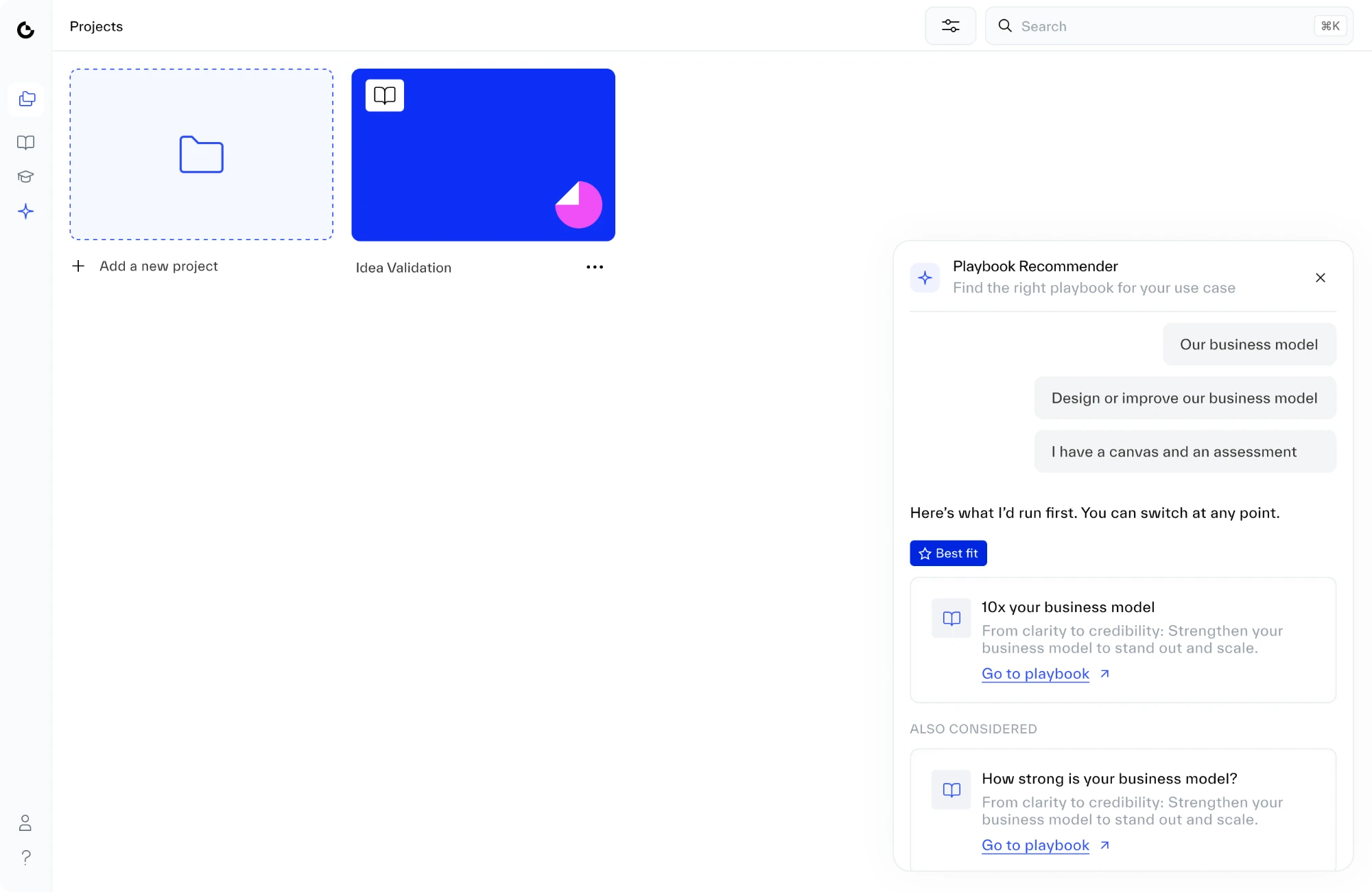
The Playbook Recommender: two or three quick questions, one recommendation, and one click to start. Behind it is a question map I built from the research, and AI handles anything people type in their own words.
Results
85%
of new customers start a project (was 57%)
95%
satisfaction (was 68%)
4×
more people come back within 30 days (10% → 40%)
~18%
of customers who had cancelled came back
The problem
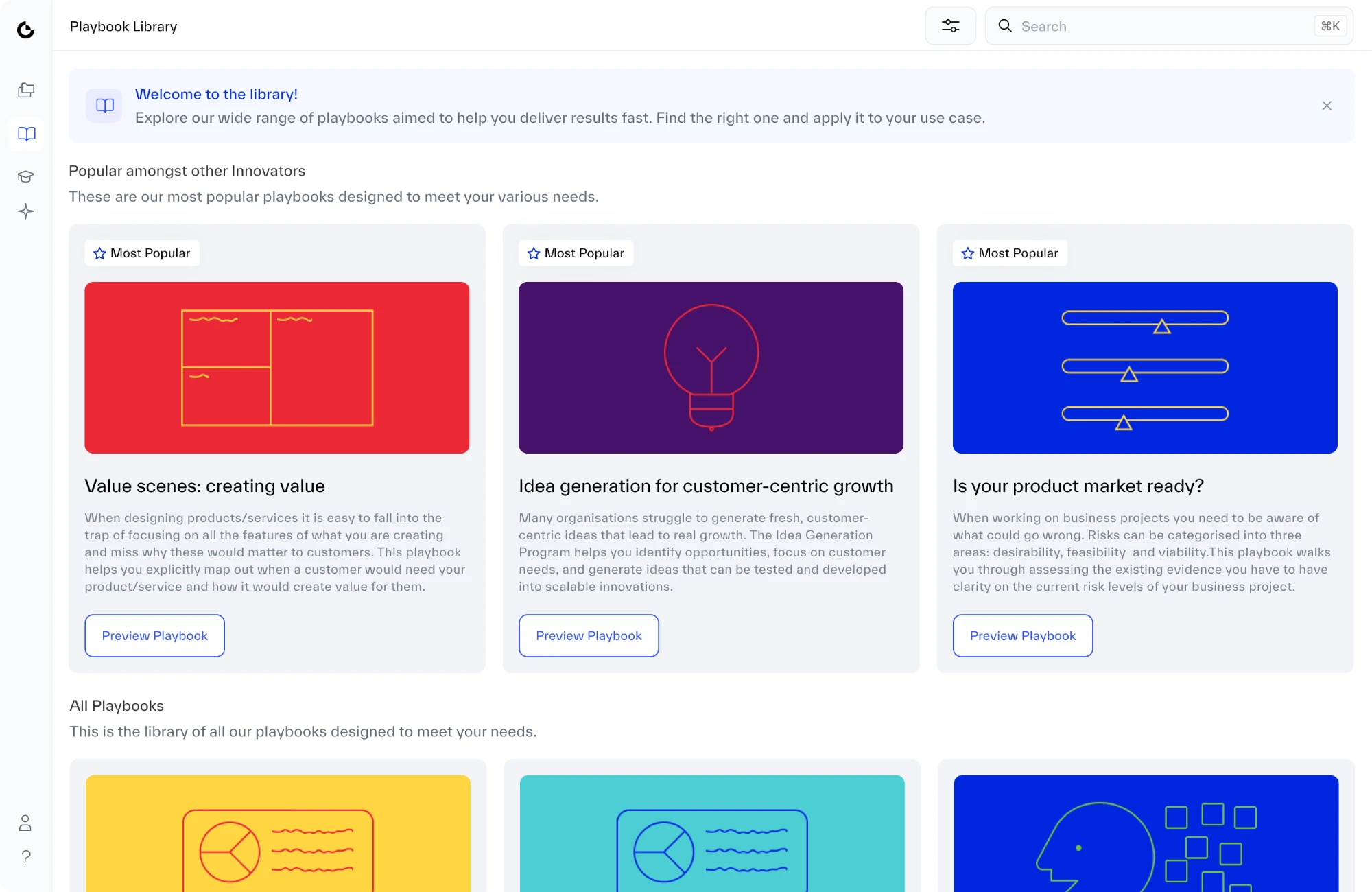
People were getting stuck on the very first choice: which playbook to start with. Each playbook takes hours, like running customer interviews or testing a price. Picking the wrong one wastes that time, so people hesitated, guessed, or gave up.
For Strategyzer, this was the costliest place to lose people. If nobody starts a playbook, nobody gets value from the product, and every number that matters, from sign-up to renewal, depends on that first step.
How people found their first playbook depended on what kind of customer they were.
Enterprise experience
Guided by a coach
A coach2–3 questionsStart here
A coach asks two or three questions, then says start here.
Self-serve experience
Left on their own
The full libraryChoosing alone?
They get the full library and have to choose alone, just when they know the least.
Hover a decision to see it in the designTap a decision to see it in the design
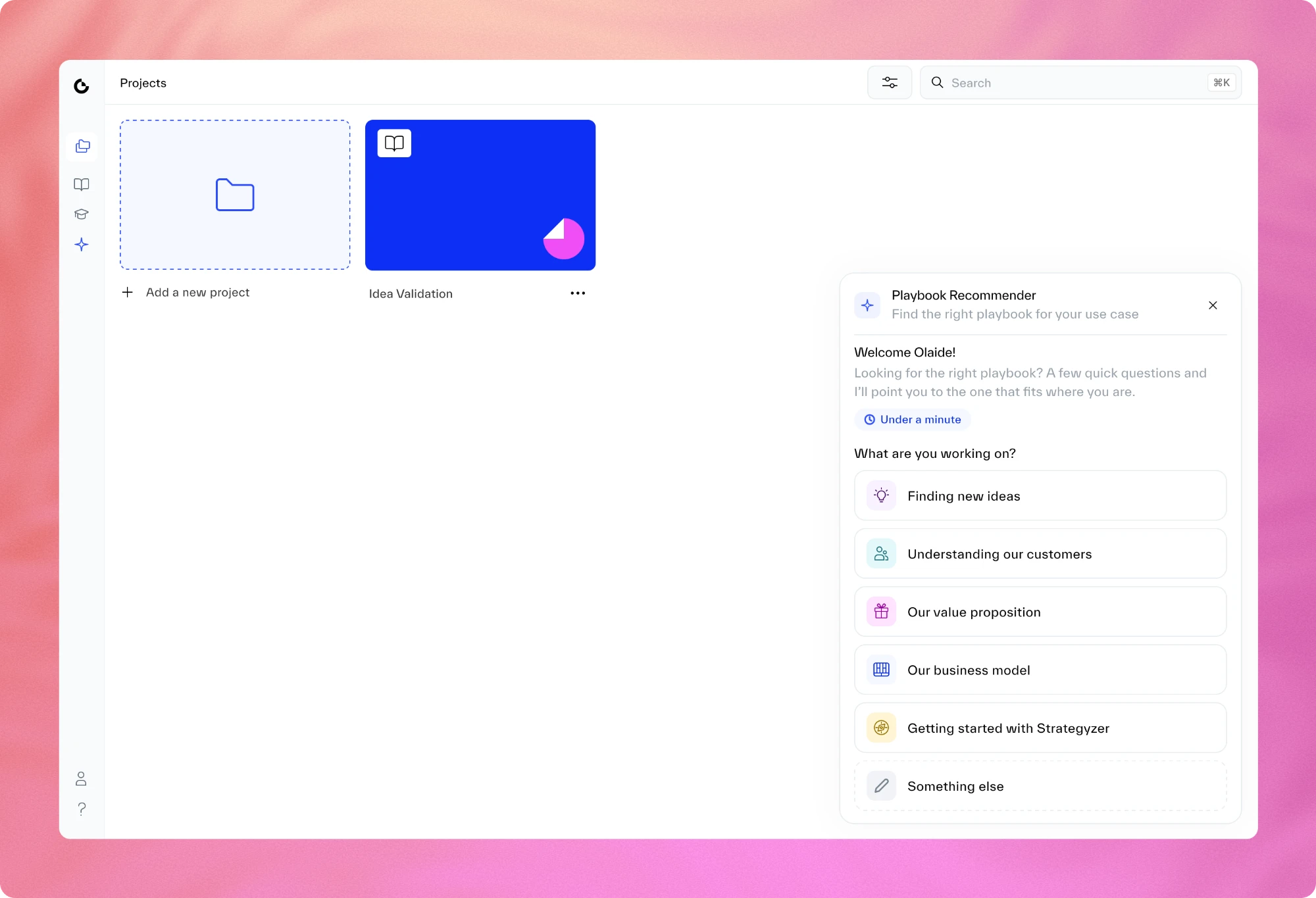
A wall of options. What a new customer sees first: long descriptions, then the whole library, and nothing to immediately say which one fits their problem.
The numbers showed the scale: about 43% of new customers never started a project.
Signed up
100%
Started a project
57%
43% stuck
After the Recommender
85%
Interviews showed why. I spoke to eight customers, plus our customer success and coaching teams.
Group 1
Solo founders
Testing an idea before pitching investors. New to Strategyzer’s terms.
I don’t know if people will pay for this.
Group 2
Heads of strategy and innovation
Testing an idea before presenting to senior leaders, often with half the work already done.
Very different people, the same problem:
Too many ideas
No clear first step
An important meeting coming up
In every conversation, the most common complaint was choosing a playbook. Even our own coaches said it.
If our coaches found it hard, the problem wasn’t our customers. It was the product. And it wasn’t only new customers: returning ones faced the same choice every time they started something new.
The first bet
Customers were asking for AI, so we started there. The first idea was ambitious: Strattie AI, an assistant across the whole platform, like having a Strategyzer coach beside you at every step. I designed it and built a working prototype with Claude, using FondUI, our design system.
A coach you could chat with. Available on every page and aware of your project. It helped people shape ideas, brainstorm and challenge their own thinking.
Help on the canvas. It could summarise people’s work, point to the evidence behind it, check their ideas, draft sticky notes and flag what was missing.
Recommending playbooks was one of its many jobs, not the whole product.
The full assistant, start to finish. From “I’m not sure who my customers are” to a finished workspace: Strattie recommends a playbook, prepares interview questions, turns the interview notes into a customer profile, and sets up the workspace. Fully prototyped, but not in the first release.
Building it for real taught us three things a static design would have hidden:
The value was in the questions. A good coach asks two or three questions before recommending anything. In an open chat, the assistant often answered before it had asked them.
Doing it well was a much bigger job than it looked. Vague requests, a changing library and knowing when to say “I don’t know” were more than our small team could take on at the time.
Chatting isn’t the right tool for where do I start? People came to us because they couldn’t put their problem into words. A chat box asks them to do exactly that.
The reframe
Engineering couldn’t build the full assistant in the time frame we needed. The team’s first instinct, a fair one, was to build a smaller version of it.
I pushed back. A smaller chatbot is just a worse chatbot.
Smaller chatbotGuided Recommender
Designing the conversationStill needed in fullA few fixed questions
Recommending playbooks that don’t existStill possibleNot possible
Describing the problemPeople have to type itPeople pick from options
Shows whether guidance helpsNot clearlyYes
So I changed the question
What’s the smallest assistant we can build?
What’s the one job that matters most right now?
Of everything the assistant could do, one job came first every time: finding the right playbook. It’s where every new project starts, and it’s where people kept getting stuck.
How I made the case
I needed to convince our CEO and our Head of Product, who was keen on the assistant. On a call, I showed them the working prototype and my research. Every group we spoke to had the same need: help choosing where to start.
The pushback
Customers were asking for AI, and a set of guided questions could look like we were falling behind.
My answer
I wasn’t against AI. The platform will need it. But choosing a playbook comes first. If people get stuck there, they’ll leave before they ever see an AI feature. Fix that first, and every AI feature we add later reaches people who are already getting value.
DecisionShip the Recommender first. The assistant comes next.
It was a trade-off, and I made it knowingly.
What it bought us
Only real playbooks. It can only recommend playbooks that exist.
Honest when nothing fits. It says so instead of guessing.
Faster than typing. Three taps instead of explaining a problem you can’t yet put into words.
Less risk. It proved guidance helps before we invested in the full assistant.
What it cost
Moved to a later release
The full assistant
Help on the canvas, which our coaches had asked for
The chat panel
The onboarding tour
That was hard to let go of, but I’d rather ship one job done well than several half-done. The first release needed to work, and the assistant could come next.
Designing the Recommender
The form
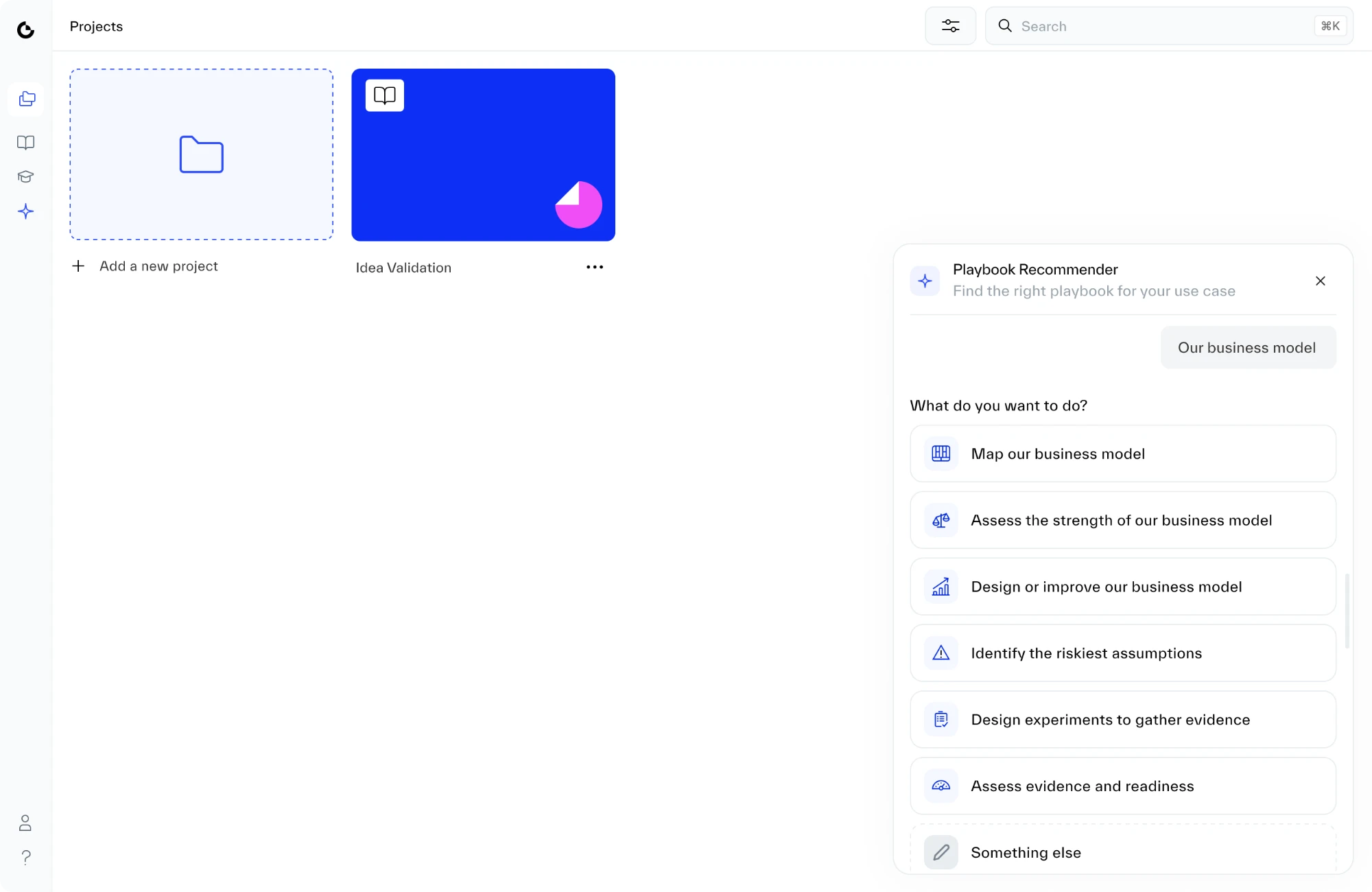
1. A small panel in the corner. I tried three shapes. A pop-up in the middle of the screen covered the library people were choosing from. A tall side panel looked like a chat that wasn’t there. A small panel in the corner won: easy to find, and the page stays usable behind it.
Pop-up in the middle Explored
Covered the library people were choosing from.
Tall side panel Explored
Looked like a chat that wasn’t there.
Small corner panel Shipped
Easy to find, and the page stays usable.
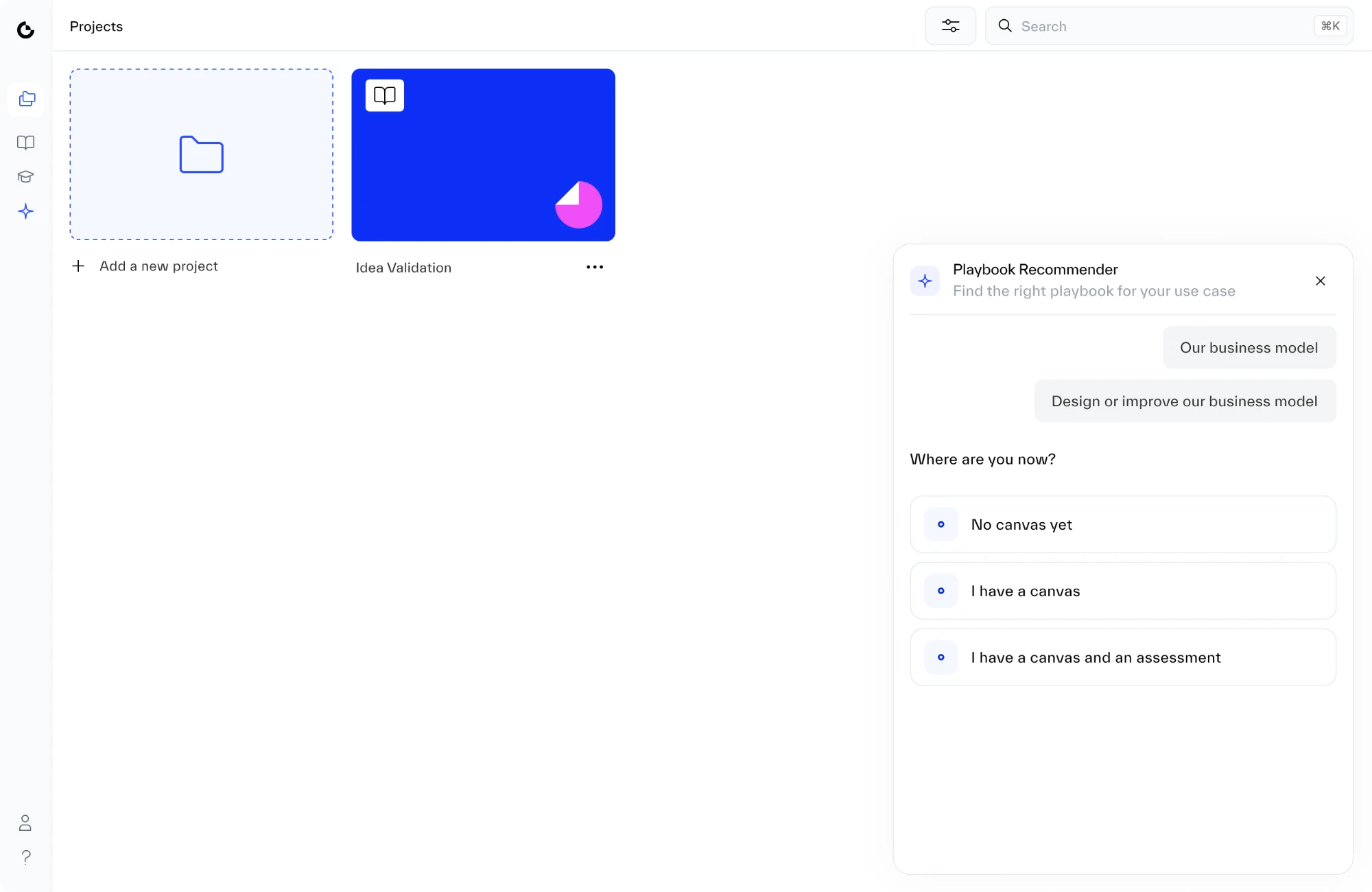
2. Answers shrink as you go. Borrowed from Asana’s AI menu: once you pick an answer, it shrinks to a short message and the next question appears below. The panel stays short and easy to read.
Three questions to a recommendation, recorded in the working prototype.
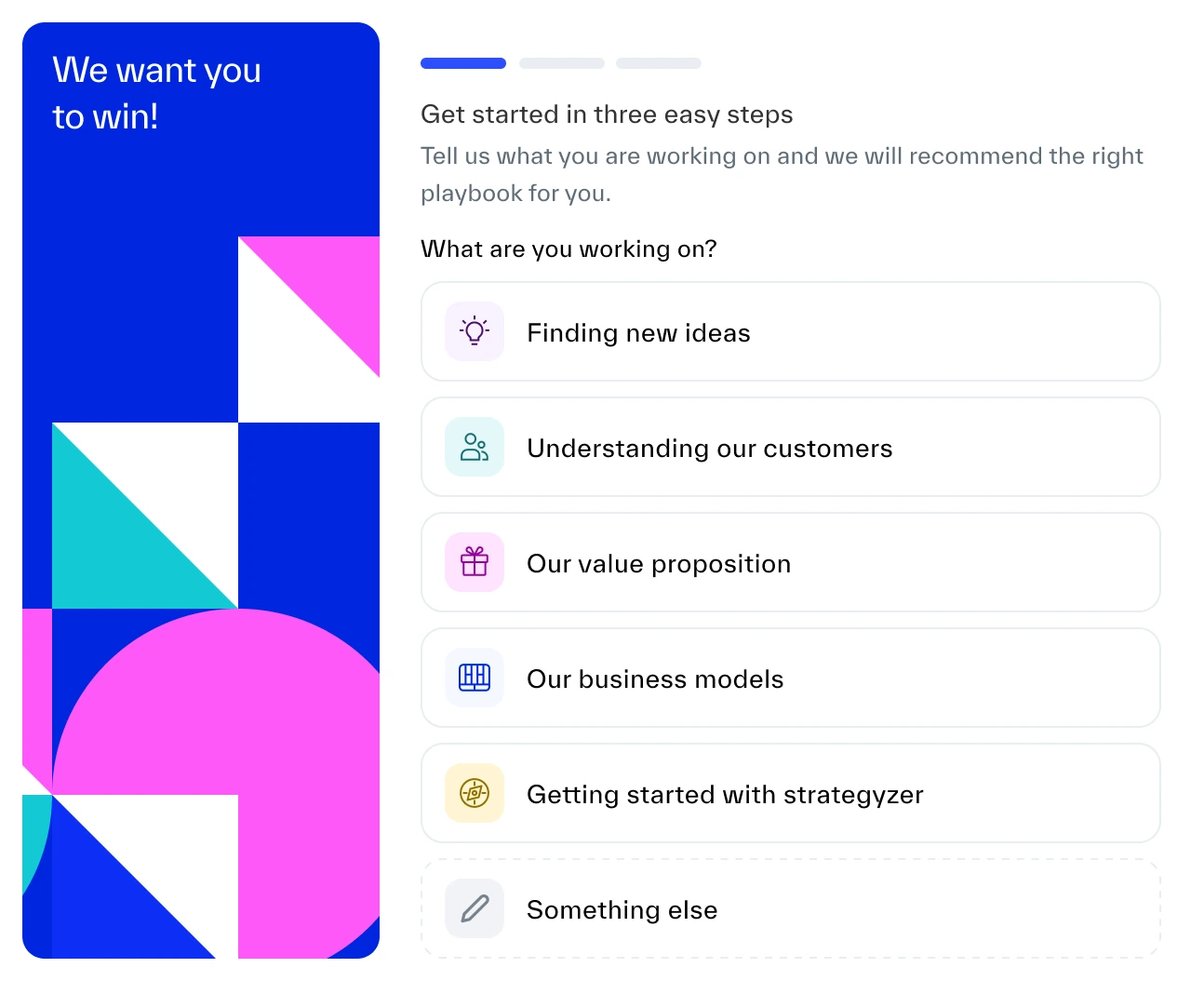
3. A tool, not a tutorial. I removed anything that promised more than it did: a chat box, a history list and expandable sections. I also dropped the tour-style version I first explored, with its progress bar and “three easy steps”, because this is a tool people return to whenever they’re stuck, not a one-time tour.
Explored · Tour-style
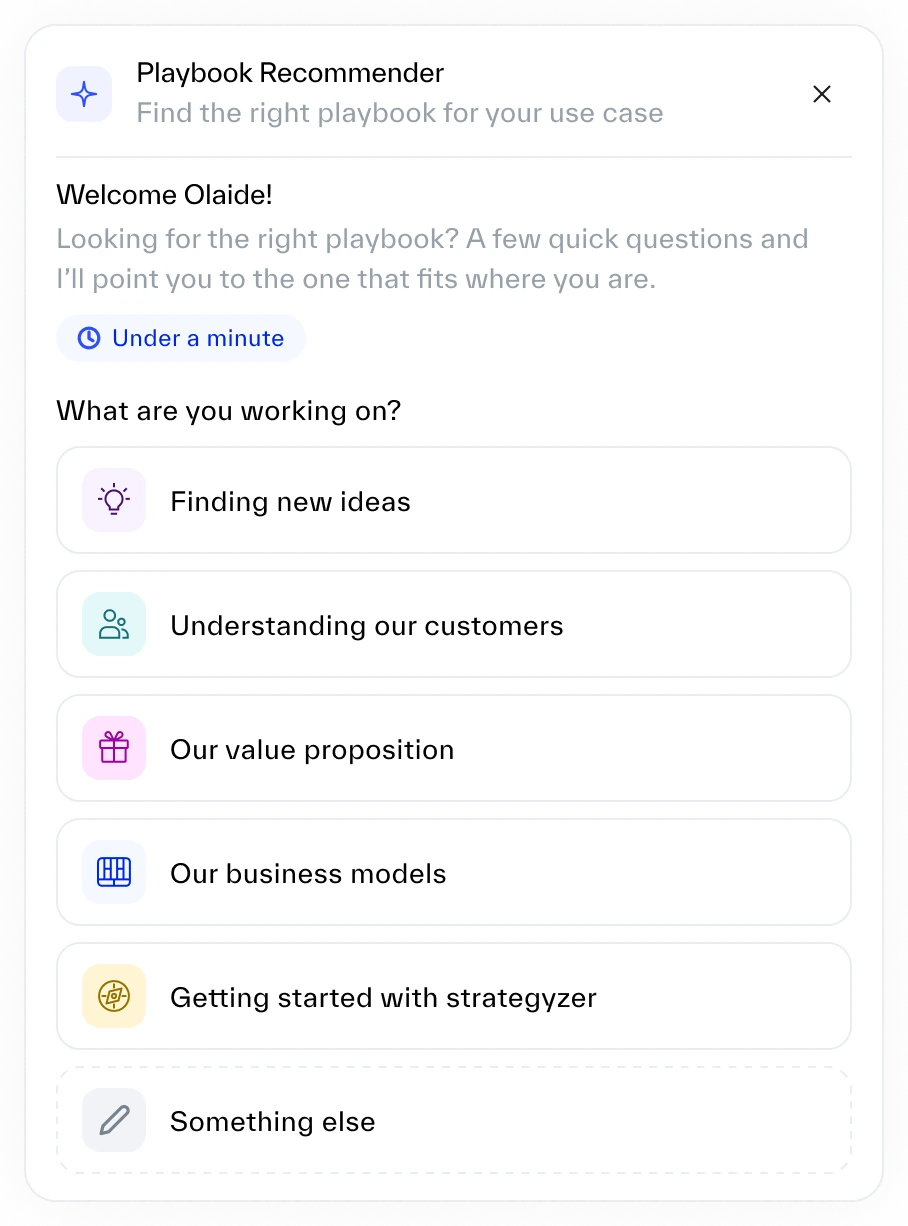
Shipped · Tool
The tour-style version I explored first, with its progress bar and big welcome screen, and the small panel that shipped.
The logic
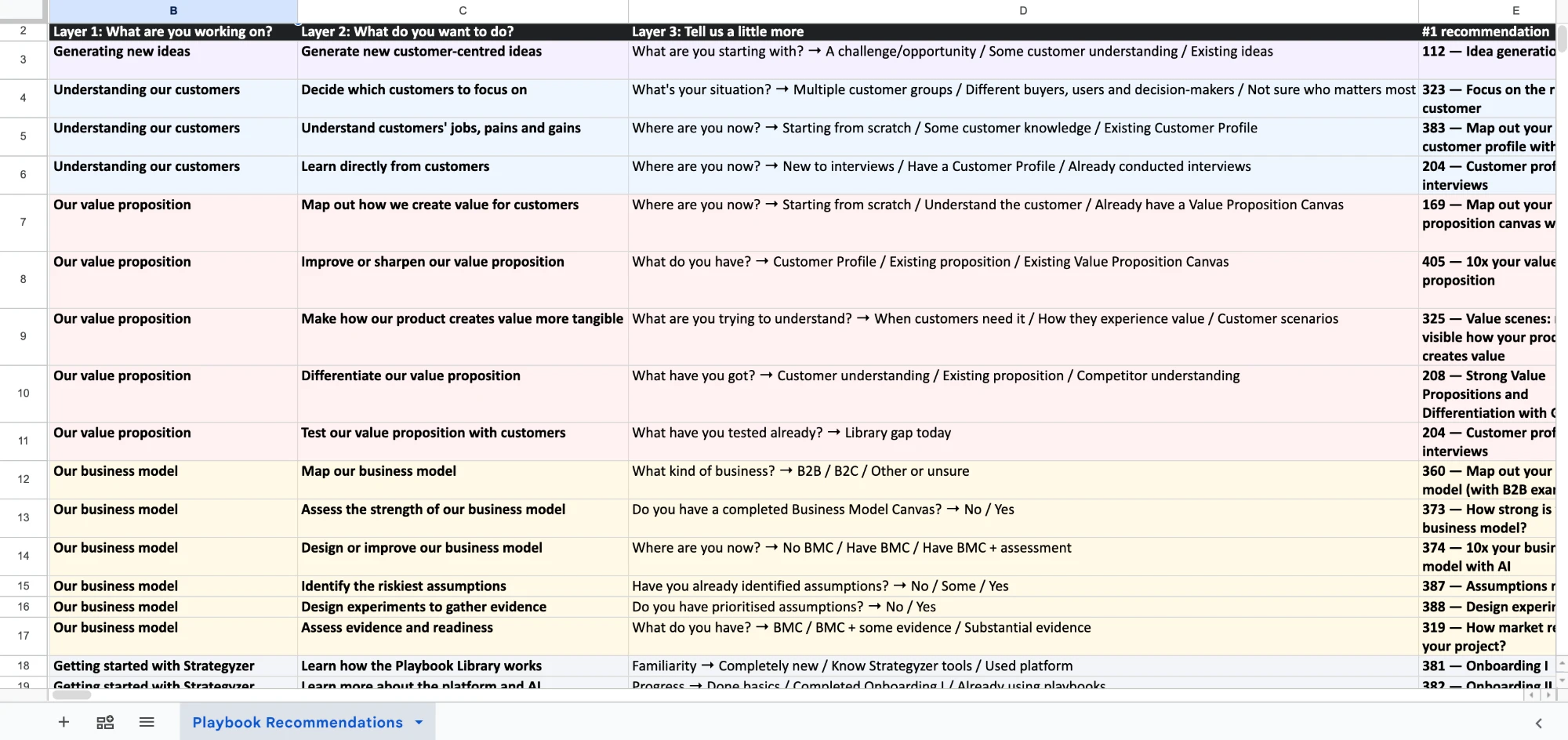
4. The questions come from research, not guesswork. Behind the questions is a map I built in two days from how customers described their situations: 5 problem areas, 17 goals and 45 paths, leading to 19 playbooks. Because it’s written down, not generated by AI, we can trust it and fix it when it’s wrong.
5problem areas
17goals
45paths
19playbooks
The question map at its real size, with one path highlighted.
The working file. Every path, mapped by hand: each question, its answers and the playbook it leads to.
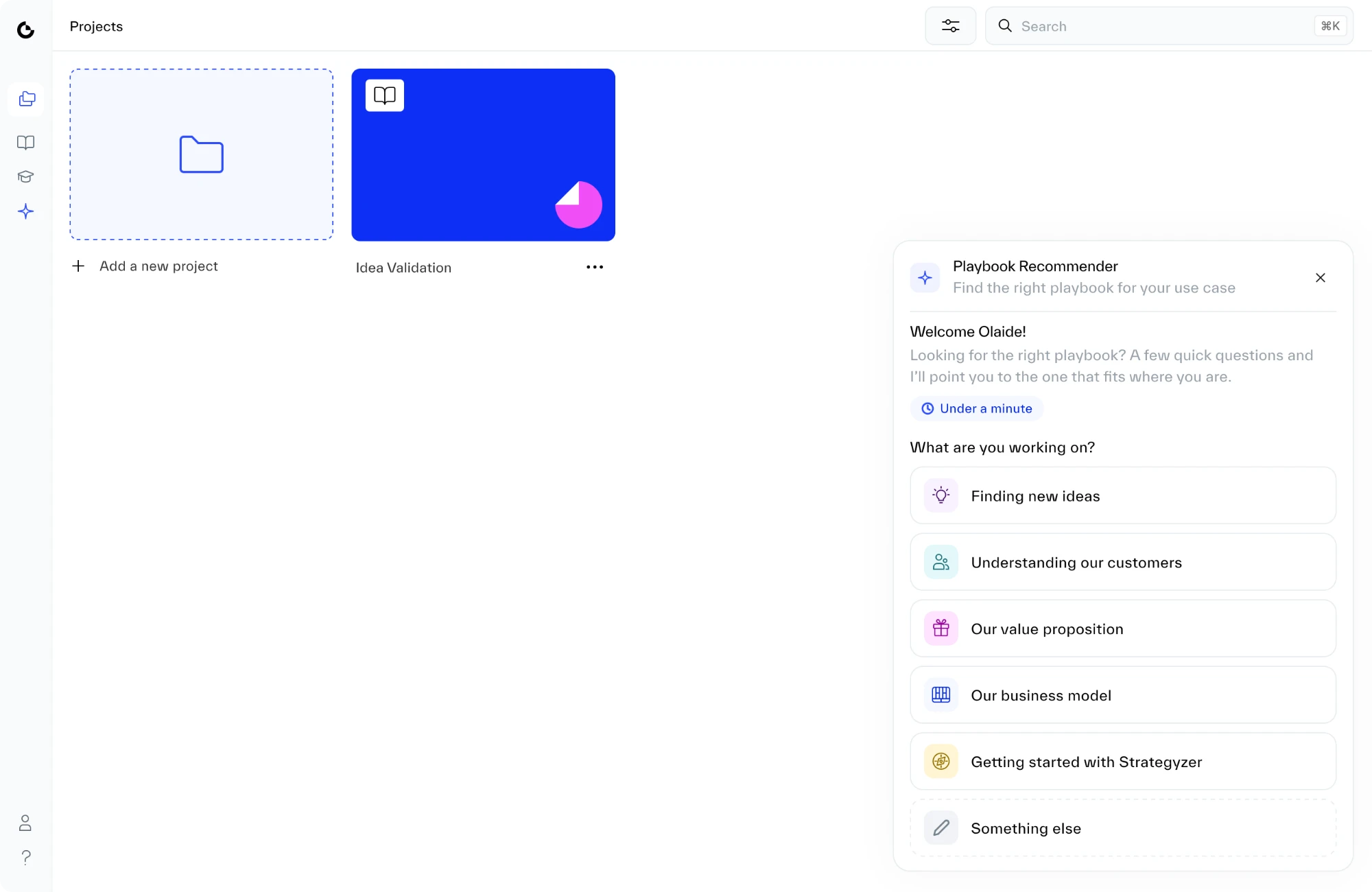
5. Questions anyone can answer. Question one asks what you’re working on in everyday words, so founders new to Strategyzer can answer it. Question three, where are you now?, only appears when it changes the answer, so people with work already done can skip ahead.
Hover a decision to see it in the designTap a decision to see it in the design
Hover a decision to see it in the designTap a decision to see it in the design
Hover a decision to see it in the designTap a decision to see it in the design
Hover a decision to see it in the designTap a decision to see it in the design
The first question asks what you’re working on, in everyday words.
6. Small details that build trust.
The panel stays the same size. Early versions grew and shrank with every answer, which felt jumpy. Now it keeps one height and the content scrolls inside.
Before
After
Before and after: the early panel jumps, the shipped one stays still.
You can change an answer without starting over. Click any earlier answer to edit it.
Hover an earlier answer and click Edit.
AI for everything else. If none of the options fit, people can pick “Something else” and type their situation. AI reads it and finds the closest playbooks from the same map, so it only suggests real ones.
It also explains its pick in plain language.
Honest when nothing fits. When there’s no good match, it says so and shows the closest options side by side, instead of pretending one is right. It was the hardest call in the project.
“No exact match yet. Nothing in the library works directly on that. These two come closest. They gather the customer evidence most questions like this turn out to need.”
The real message people see when nothing fits.
No fake “thinking”. Questions appear instantly. There’s a short pause only before the recommendation, where the work actually happens.
Tested before it shipped
Because I built it in code, people could use the real thing, not react to pictures of it.
~24
sessions with coaches, customer teams and customers, about 8 each
Biggest change
I rewrote the questions so they were easier to understand, and so no one worried about picking the wrong answer.
From recommendation to work
A recommendation is only useful if people act on it. In the library, the results filter what’s shown. Inside a project, one click adds the playbook and starts it.
The library updates too. It filters to the recommended playbooks.
From recommendation to started. One click on Add to this project, and the playbook appears in the project.
From stuck to started in about fifteen seconds, which is what the project set out to do.
Stuck
Question 1
Question 2
Question 3
Started
0sAbout fifteen seconds~15s
Designing in code, with AI as a partner
I designed this in code, not Figma. I built the front end myself with Claude, and that code went straight into the product. There was no handover and no rebuild. Our engineer connected it to the data behind it, and it went live.
Who built what.
Me
The front end, designed and built in code
Built with Claude on FondUI, our design system, which I’d set up so Claude could use it. It’s the code customers use today.
Our engineer
Everything behind it
Data, tracking and connecting it to the rest of the platform
The prototype became the product. My conversation with Claude on the left, the working front end on the right. This code went into the product as it was.
Claude helped with the rest of the work too, from summarising interview notes to brainstorming directions with me. Building in code changed how the whole project ran.
Research1–2 weeks
Assistant prototypeDays
Question map2 days
Recommender: built with Claude, tested, refined3 weeks
Launch~1½ weeks
About six weeks in total. Black marks what I built in code with Claude: the assistant prototype, in days, and the Recommender that shipped.
Decisions were made on something real: a working product, not slides.
Tricky cases showed up early, while they were cheap to fix, like changing an answer or finding no match.
Testing was real: people used the actual product, so their feedback changed the design.
Checked automatically: automated tests clicked through every step and caught things that looked right but didn’t work.
Results
The Recommender is live. When people got stuck at the first step, they didn’t see the value, didn’t come back, and some cancelled. Fixing that first step improved every one of those numbers.
Live in the product. The Playbook Recommender, available wherever people start something new: in the Playbook Library and inside every project.
Getting started
85%
of new customers now start a project and a playbook
Was 57%
Satisfaction
95%
customer satisfaction
Was 68%, from customer surveys and our customer success team
Coming back
4×
40% of people return within 30 days of signing up
Was about 10%. Most come back weekly
Revenue
~18% came back
of customers who had cancelled returned to try the Recommender
Within two weeks of the release email
How we measured: product data for getting started and coming back, customer surveys and feedback for satisfaction. Each compares the months before and after launch, over four months in total.
The jump in people coming back says the most about the design. With the right playbook from the start, people had a reason to return, week after week.
Beyond the numbers
How we work
From design to live in days, not weeks
What I built with Claude went live as it was. Our engineer didn’t rebuild it from designs. They connected it to the data behind it. No handover documents, and no back-and-forth to match the design.
The team now works at least twice as fast.
Daysfrom design to live, down from 2–3 weeks
2×faster as a team, at least
Usual path2–3 weeks
MockupsSpecUI rebuildDesign QAFixesLive
This projectDays
Built in codeBack endSpecUI rebuildDesign QALive
Product strategy
The research found a missing playbook
Mapping every customer need to a playbook showed a gap: nothing helped people test whether customers want their offer, something many customers came to us needing. The Recommender says so instead of guessing, and the team that writes playbooks started on one straight away.
45 → 19paths mapped to playbooks
1 gappicked up straight away by the team that writes playbooks
Customer needPlaybook
Generate new ideasCovered
Understand customersCovered
Design a value propositionCovered
Test whether customers want itNo playbook yet
Business modelsCovered
✦
Playbook Recommender
No playbook tests a value proposition directly yet. That is a gap we know about.
What this project shows about how I work
I let evidence decide, then bring people with me.
When we had to choose, I brought a working prototype and my research, and answered the hardest objection directly.
Next: the full assistant. The Recommender fixes the first step. Next, I’ve recommended building Strattie AI, the assistant I prototyped at the start, to help at every step after that. It’s on the roadmap for the next year.
Customer journeyFind a playbookBrainstormValue propositionSummarise workFind evidenceCheck ideas
Live now
Playbook RecommenderThe first step
NextWithin a year
Question mapReused
Strattie AI assistantThe whole journey, already prototyped
The Recommender covers the first step. The assistant would cover the rest, and reuse the question map whenever it suggests a playbook.
Why it’s now easier to build. The Recommender gives the assistant a head start: proof that guidance works (57% → 85%), a question map it can reuse, real examples of how customers describe their problems, and a working prototype.
What I’d watch until then: how quickly people start a playbook, how often they keep using the Recommender, and what people ask for that it can’t answer yet.
Shipping one focused thing first kept the bigger vision alive, and gave us the evidence for the next step.